This is how my statusline looks like:
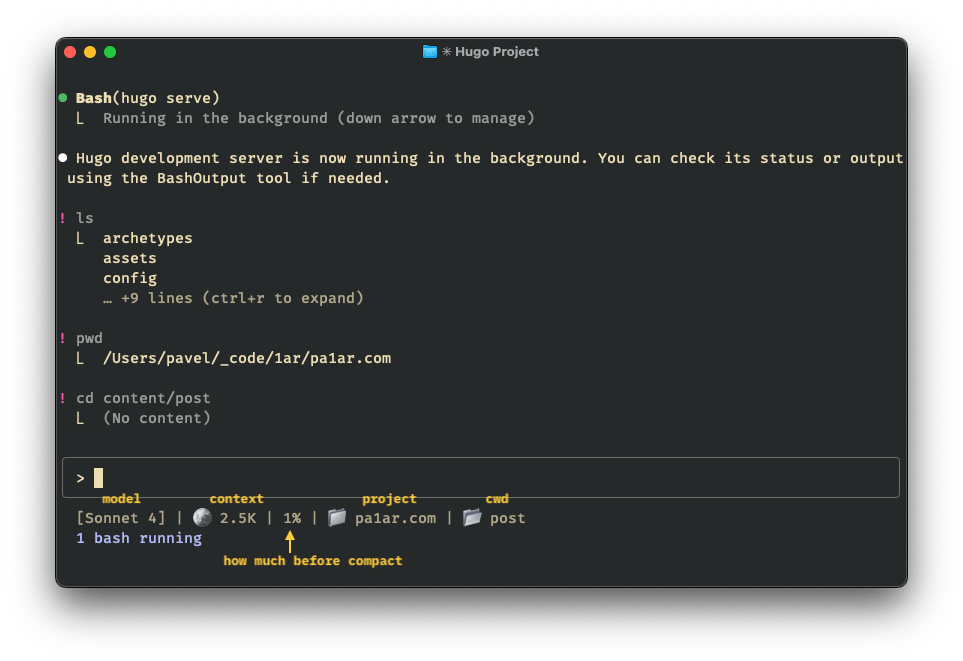
Save to ~/.claude/statusline-command.sh:
 1
 2
 3
 4
 5
 6
 7
 8
 9
10
11
12
13
14
15
16
17
18
19
20
21
22
23
24
25
26
27
28
29
|
#!/bin/bash
input=$(cat)

MODEL=$(echo "$input" | jq -r '.model.display_name')
AGENT=$(echo "$input" | jq -r '.agent.name // empty')
DIR=$(echo "$input" | jq -r '.workspace.current_dir')
PCT=$(echo "$input" | jq -r '.context_window.used_percentage // 0' | cut -d. -f1)
DURATION_MS=$(echo "$input" | jq -r '.cost.total_api_duration_ms // 0')

CYAN='\033[36m'; GREEN='\033[32m'; YELLOW='\033[33m'; RED='\033[31m'; RESET='\033[0m'

# pick bar color based on context usage
if [ "$PCT" -ge 90 ]; then BAR_COLOR="$RED"
elif [ "$PCT" -ge 70 ]; then BAR_COLOR="$YELLOW"
else BAR_COLOR="$GREEN"; fi

FILLED=$((PCT / 10)); EMPTY=$((10 - FILLED))
BAR=$(printf "%${FILLED}s" | tr ' ' '█')$(printf "%${EMPTY}s" | tr ' ' '░')

MINS=$((DURATION_MS / 60000)); SECS=$(((DURATION_MS % 60000) / 1000))

BRANCH=""
git rev-parse --git-dir > /dev/null 2>&1 && BRANCH=" | 🌿 $(git branch --show-current 2>/dev/null)"

MODEL_DISPLAY="$MODEL"
[ -n "$AGENT" ] && MODEL_DISPLAY="$MODEL / $AGENT"

echo -e "${CYAN}[$MODEL_DISPLAY]${RESET} 📁 ${DIR##*/}$BRANCH"
echo -e "${BAR_COLOR}${BAR}${RESET} ${PCT}% | API time ${MINS}m ${SECS}s"
|
Add to ~/.claude/settings.json:
1
2
3
4
5
6
|
{
  "statusLine": {
    "type": "command",
    "command": "bash ~/.claude/statusline-command.sh"
  }
}
|
Check out the official statusline docs for all available options and fields.