The Problem
Claude Code has a 200K token context window and automatically runs /compact at ~80% usage. Without visibility into your context consumption, you won’t know you’re approaching the limit until it happens.
Solution: Custom Statusline
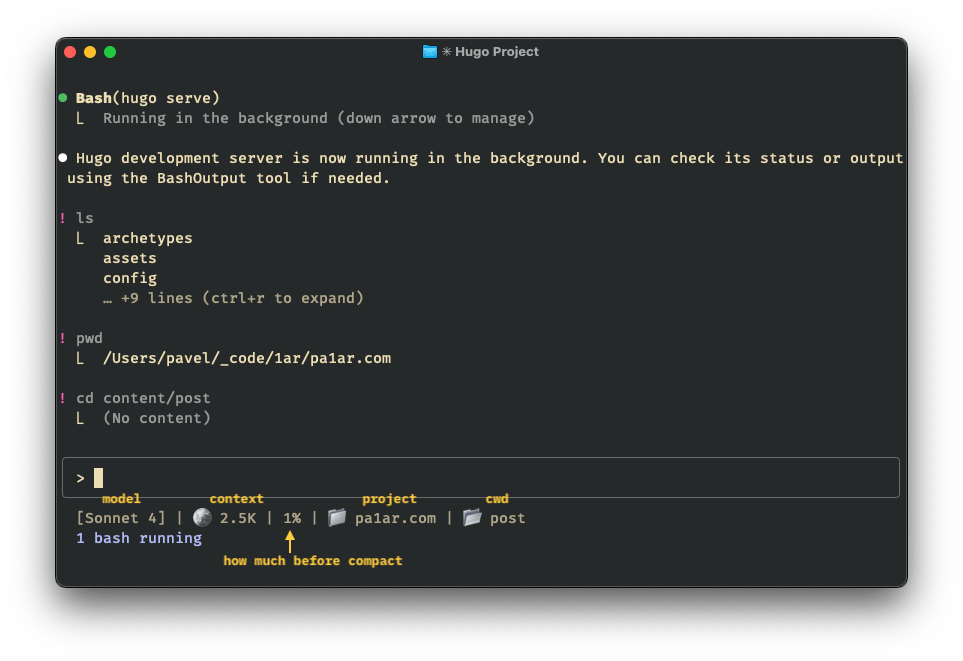
With statusline customization, you can display real-time token usage:
1
|
[Opus 4.5] | 🪙 56.8K | 35% | 📁 project-name | 📂 current-dir
|
Setup
Step 1: Create the Script
Save to ~/.claude/statusline-command.sh:
 1
 2
 3
 4
 5
 6
 7
 8
 9
10
11
12
13
14
15
16
17
18
19
20
21
22
23
24
25
26
27
28
29
30
31
32
33
34
35
36
37
38
39
40
41
42
43
44
45
46
47
48
49
50
51
52
53
54
55
56
57
58
59
60
|
#!/bin/bash

# read JSON input from stdin
input=$(cat)

# extract values
model=$(echo "$input" | jq -r '.model.display_name // "Claude"')
cwd=$(echo "$input" | jq -r '.workspace.current_dir')
project_dir=$(echo "$input" | jq -r '.workspace.project_dir')
session_id=$(echo "$input" | jq -r '.session_id // empty')

# get directory names
project_name=$(basename "$project_dir")
if [ "$cwd" = "$project_dir" ]; then
  cwd_name="."
elif [ "$cwd" = "$HOME" ]; then
  cwd_name="~"
else
  cwd_name=$(basename "$cwd")
fi

# estimate tokens from session transcript
token_display="--"
used_pct=""
if [ -n "$session_id" ] && [ -n "$project_dir" ]; then
  # convert project_dir to claude's path format
  # /Users/name/_code/foo.bar -> -Users-name--code-foo-bar
  project_path=$(echo "$project_dir" | sed 's|^/||; s|_|-|g; s|\.|-|g; s|/|-|g; s|^|-|')
  transcript_file="$HOME/.claude/projects/${project_path}/${session_id}.jsonl"

  if [ -f "$transcript_file" ]; then
    # find last compaction point (if any) and only count bytes after it
    compact_line=$(grep -n '"isCompactSummary":true' "$transcript_file" 2>/dev/null | tail -1 | cut -d: -f1)
    if [ -n "$compact_line" ]; then
      # count bytes from lines after compaction
      file_size=$(tail -n +$((compact_line + 1)) "$transcript_file" | wc -c | tr -d ' ')
    else
      file_size=$(stat -f%z "$transcript_file" 2>/dev/null || stat -c%s "$transcript_file" 2>/dev/null || echo 0)
    fi
    # ~8 bytes per token (JSON overhead in JSONL)
    tokens=$((file_size / 8))
    if [ "$tokens" -ge 1000 ]; then
      token_display=$(awk "BEGIN {printf \"%.1fK\", $tokens/1000}")
    else
      token_display="${tokens}"
    fi
    # percentage of 200K context window
    used_pct=$((tokens * 100 / 200000))
    [ "$used_pct" -gt 100 ] && used_pct=100
  fi
fi

# build status line
status="[${model}]"
status="${status} | 🪙 ${token_display}"
[ -n "$used_pct" ] && status="${status} | ${used_pct}%"
status="${status} | 📁 ${project_name}"
[ "$cwd_name" != "." ] && status="${status} | 📂 ${cwd_name}"

printf '%s' "$status"
|
Add to ~/.claude/settings.json:
1
2
3
4
5
6
|
{
  "statusLine": {
    "type": "command",
    "command": "bash ~/.claude/statusline-command.sh"
  }
}
|
Step 3: Make Executable and Restart
1
|
chmod +x ~/.claude/statusline-command.sh
|
Restart Claude Code to see the new statusline.
How It Works
- Token estimation: Counts transcript file size, ~8 bytes per token (accounts for JSON overhead). Note: this is a rough approximation—actual token count may vary by ±10%
- Compaction-aware: Resets count after
/compact by detecting isCompactSummary markers
- Path conversion: Claude stores transcripts at
~/.claude/projects/{project-path}/{session_id}.jsonl where /Users/name/project becomes -Users-name-project
[model] - Current Claude model🪙 tokens - Estimated token count (K notation)% - Context usage toward 200K limit📁 project - Project directory name📂 cwd - Current working directory (hidden if same as project)
Sources
Based on work by @pnd.